Every cuelands at thesame loudness.
CueLevel measures your show's audio and video cues and brings each one to −18 LUFS for the PA. One exact gain change per cue. Nothing else in the file is touched.
By downloading, you agree to the terms. CueLevel collects no personal data (privacy).
Cue 12 is a whisper. Cue 13 takes the roof off. Between them, the person at the desk is riding a fader instead of watching the stage.
CueLevel fixes the files before the show, so every cue plays at the level you set at soundcheck.
The whole show on one screen.
Your cues on the left, the cue in the middle, and what CueLevel will do on the right, before it does anything.

Your show, measured on arrival
Drop audio or video in. Each cue shows its length, its loudness and a dot on the ruler, coloured by level.
Where it is, and where it lands
The readout shows the cue now and after levelling, against your −18 LUFS target and the range your good cues sit in.
The plan, before anything changes
Every step CueLevel will take, with the reason and a tick box to skip it. Press Level this cue and the copy lands in your Levelled folder.
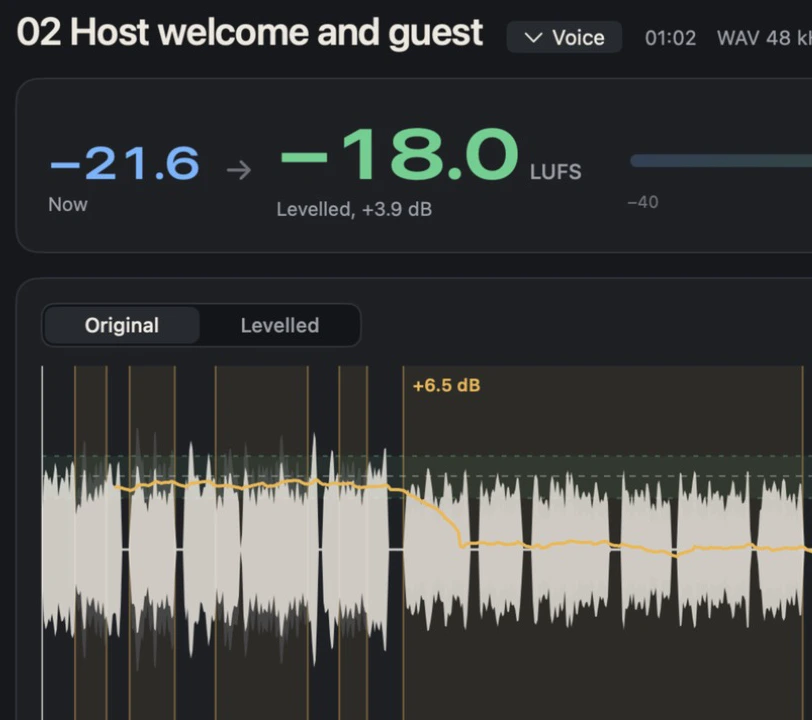
A quiet guest, brought into line.
Even out finds stretches more than 3 dB louder or quieter than the rest of the cue and turns them back in the nearest pause. No fades, no pumping, no compression. Songs are left as they are.

 Original, with Even out's sectionsLevelled
Real CueLevel output for the example host and guest cue: 9 stretches evened, then +3.9 dB to −18.0 LUFS.

Or take the fader yourself.
Edit mode is a clip gain editor. Drag a section up or down, trim the silence, set fades, mute a cough, drop a marker. Every change shows its value in dB, and undo goes all the way back.
Lossless, and you can check.
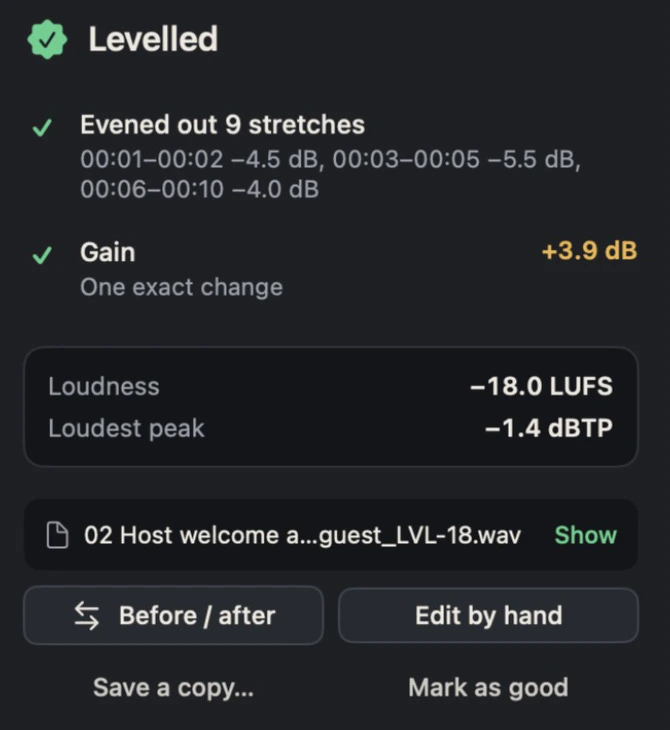
One exact gain change.
No compression, no limiting, no resampling. The levelled file is the original, made louder or quieter.
The host cue above, raised from −21.6 to −18.0 LUFS after evening out.
The picture is copied bit for bit.
Video files keep their picture, timecode and extra audio tracks. Only the first audio track is levelled.
- Video stream checksum, original
- 9b4f971056f90d3da174246fe98b23e1
- Video stream checksum, levelled copy
- 9b4f971056f90d3da174246fe98b23e1
- Identical. MD5 from our own test of a levelled MP4.
Already good is left alone.
A cue within 1 LU of the target, with nothing uneven, is saved as an exact copy, so the folder still has every cue.
The example sponsor reel: −17.9 LUFS, peaks −6.6 dBTP. Nothing was changed.
Peaks stay under the ceiling.
If a cue can't reach the target without its peaks going over −1 dBTP, it stays quieter and tells you by how much. Nothing is squashed to make it fit.
The example piano cue, kept at −20.3 LUFS so its loudest note stays clean.
Hear what it does.
Four short cues, made in your browser at four very different levels. Play the show, then switch levelling on and play it again.
The app measures loudness in LUFS (EBU R 128). This demo matches RMS levels in your browser, which is close enough to hear the point.
Built for the person at the desk.
Drop a whole show
Drop a folder of audio and video. Levelled copies land in Desktop › CueLevel › Levelled, named after the original with _LVL-18.
Checks the source
Clipping, DC offset, left and right out of phase, silence at the ends and extra audio tracks, explained in plain words.
Knows a song from a speech
Each cue is Voice, Music or Music + voice. Music is never evened out, and cues that play straight through like a song are left as they are.
Learns what good sounds like
Mark finished cues as good. CueLevel keeps their measurements and checks every new cue against them.
Video stays video
MOV and MP4 keep their picture, timecode and other audio tracks untouched. The levelled copy plays in Resolume, QLab or ProPresenter like the original.
Stays on your Mac
Nothing is uploaded and there's no account. Updates install themselves after you say yes.
From folder to PA in three steps.
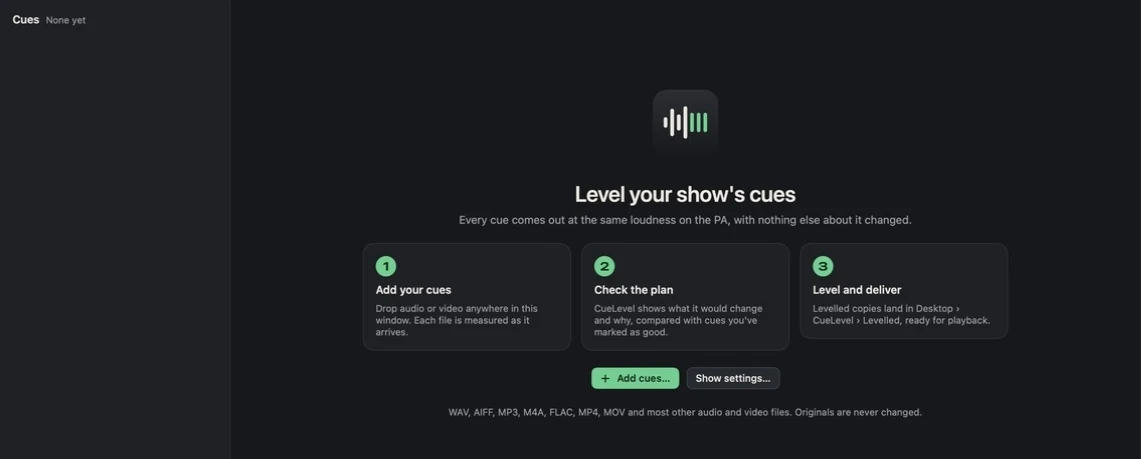
1Drop the show
Drag the cue folder in. Every file is measured as it arrives.
2Check the plan
See each cue’s loudness now and after, and every stretch Even out will change.
3Level and play
Press Level all. The copies are in your Levelled folder, ready for playback.
Specs.
| Loudness target | −18 LUFS by default, any target from −30 to −12 LUFS |
|---|---|
| Peak ceiling | −1 dBTP by default, from −6 to −1 dBTP |
| Measurement | EBU R 128 loudness and true peak (ITU-R BS.1770) |
| Files in | WAV, AIFF, MP3, M4A, FLAC, MP4, MOV and most other audio and video files, or whole folders |
| Files out | Uncompressed WAV at the source sample rate; video as MOV with the original picture copied |
| Processing | On your Mac. No account, no uploads |
| Requires | macOS 13 Ventura or later on a Mac with Apple silicon |
| Price | Free |